Data Portability Overview
Ring Data Portability offers authorized third parties the capability to programmatically import Ring customers' data to an app or website after the customers give authorization through Login With Ring (LWR).
Ring Data Portability allows 3P apps or websites to access and retrieve a customer's Ring data, based on the customer's explicit authorization through Ring Data Portability scopes. The Scopes are defined the type of data the customers are authorizing third parties to access. See RingScopes for details.
This document explains how Ring Data Portability works and guides you through these three-high level sections: (1) configure the Ring Data Portability service, (2) authorize your app and/or website, and (3) connect with Ring Data Portability API. You need to complete the steps in each section before your app or website can import customers' data.
Ring Data Portability enables customers to programmatically port to authorized third party apps or websites portions of their Ring data from these countries: Belgium, France, Germany, Ireland, Italy, Netherlands, Poland, Spain, and Sweden.
This document assumes that you have an app or website ("Application") ready to add the Login With Ring button. This doesn’t cover guidelines on how to build an Application.
Want to know how Ring Data Portability works? Proceed to Ring Data Portability workflow.
Ring Data Portability workflow
From your Application, Ring customers will use the Login with Ring button. Ring will display the Sign in page where customers sign in using their Ring credentials. The Sign in operation is paired with Transaction Intent Verification to verify Ring customer’s credentials. If customers sign in, Ring displays the Authorization page with available Ring Data Scopes.
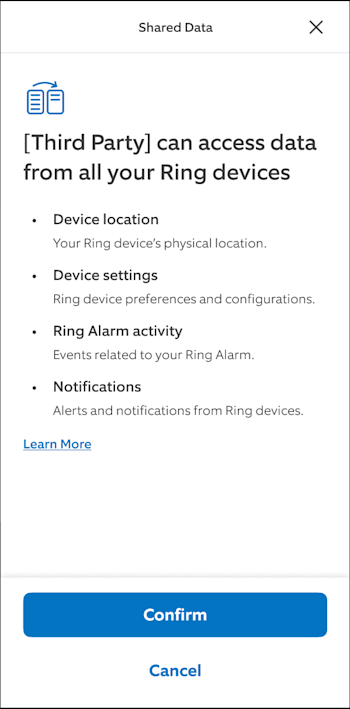
Sample User Transfer Preferences page
On the Authorization page, customers select Confirm or Cancel. If the customer selects Cancel, the workflow ends. Your Application won’t have the capability to import that customer’s data. If the customer selects Confirm, Ring displays the User Sharing Preferences page.
Ring Data Portability scopes can be requested by your Application, which means that a customer can review and consent the information they will be sharing.
On the User Sharing Preferences page, Ring provides option for the customers to set their preferences, acknowledge the authorization, and select the Cancel or Authorize button. If the customer selects the Authorize button, it activates the Ring Data Portability in your Application, providing authorization to import that customer’s data. If the customer selects Cancel, your Application won't be authorized to import that customer's data.
Once the customer selects Authorize, you will use the Login with Ring to get the customer’s authorization (OAuth2) code. You will use the OAuth code to get access and refresh tokens, which you will need to call the Ring Data Portability API and import the customer’s data in your Application.
🚧 Importing user data in your Application is asynchronous. Please ensure your Application has an HTTPS endpoint.
Want to learn how Ring provides option for the customers to select what data to consent to?Proceed to User Transfer Preferences.
User transfer preferences
Data that are ported to your Application depends on the preferences set by the customer in the User Transfer Preferences page.

User Transfer Preferences page
How much data to transfer?
Customers select how much data your Application can import by selecting a past date. The drop-down list offers these options: 5 days ago, 30 days ago, 60 days ago, 1 year ago and Since date xx/xx/xxxx.
For how long do you authorize the transfer?
Customers select how long your Application can import data by selecting a future date. The drop-down list offers these options: One time transfer, For the next 30 days, For the next 90 days, For the next 180 days, and For the next 1 year. Once the selected period expires, your Application will be unable to import customers data unless the customer provides a new authorization.
🚧 Authorization ends when customers revoke access or tokens expire. Customers receive an email about authorization changes and expirations.
Developer data handling practices
Customers are informed that their data will be handled subject to your privacy practices and policies.

I authorize the third party to receive my EU data
Customers mark the checkbox to authorize your Application to import their Ring data. After the customers select the Authorize button, your Application will have the capability to import customers’ data. If the Ring customers exit from this page or select Cancel, your Application won’t have the capability to import customers’ data.
🚧 To import customers' data, you will need to complete the steps in the Configure Ring Data Portability service, Authorize your app to connect with Ring Data Portability API, and Connect your app with Ring Data Portability API.
Steps to Onboard with Ring
Step 1: Send an email to ring-data-portability-ipv@amazon.com with the below details to begin the onboarding process: Email address Company Name, Company Address, Name of the Business Owner or Legal Representative Please attach the Business license to the email Step 2: Respond to emails/queries/meeting invites from the Ring/Amazon teams to help kickstart the onboarding process. Step 3: A questionnaire will be shared after validating the above details. Fill the details and share it for further validation. Step 4: Respond to emails/queries during the Third Party Security Assessment until its successful completion. Step 6: Send an email to ring-data-portability@amazon.com to request credentials, and share the TPSA(Third party Security Assessment) ID for reference. Step 5: Enable the customer experience (CX) in the 3P website and app.
Authorize your application to connect to Ring Data Portability for EU DA
Initiating the authorization Flow
After onboarding, you will receive a client_id and client_secret, which are used for subsequent OAuth 2.0 API interactions.
To initiate the authorization flow, direct users to the appropriate authorization endpoint:
- For Ring:
GET https://oauth.ring.com/v2/authorize - For Blink:
GET https://api.oauth.blink.com/v2/authorize
This endpoint must be called with an HTTP GET request, with all required parameters provided as form-encoded query parameters. These include:
client_id:Provided during onboardingredirect_uri:The URI to redirect the user after authorization; must match a registered URI from onboardingscope:The access scope; use "data-portability"code_challenge:The PKCE code challenge (derived from your code verifier)code_challenge_method:encryption method used for the code challenge. IE: S256 / plainstate:An opaque value the client provides to help protect against CSRF. We return it unchanged; it’s up to the client to generate and validate it.
Example Request:
GET https://oauth.ring.com/v2/authorize?
    redirect_uri=<your_redirect_uri>&
    client_id=<your_client_id>&
    response_type=code&
    scope=data-portability&
    code_challenge=<your_code_challenge>&
    code_challenge_method=S256&
    state=<random_state>
When this request is made, the user will be guided through the Ring or Blink login experience. Once complete, the user will be redirected to the specified redirect_uri with two key query parameters appended:
code:The authorization code, used to request tokensstate:The same value you originally sent; verify this to ensure request integrity
In the case of any errors that occurs, or if the user cancels the authorization flow during the Ring/Blink login experience, the user will be redirected back to the provided redirect_uri with the following parameters:
https://<your_redirect_url>?error=<error_message>&error_description=<error_description>&state=<your_state_provided_earlier>
An example of when a user cancels the experience will look like the following:
?error=access_denied&error_description=The+resource+owner+or+authorization+server+denied+the+request&state=<your_state_from_earlier>
Exchanging Authorization Code for Tokens
To exchange the authorization code for an access token and refresh token, make the following POST request to the token endpoint:
  POST https://oauth.ring.com/oauth/token
  Content-Type: application/x-www-form-urlencoded
Required form parameters:
grant_type:"authorization_code"client_id:Your client IDclient_secret:Your client secretcode:The authorization code received from the redirectredirect_uri:Must match the original redirect URIcode_verifier:The original PKCE string that must correspond to thecode_challenge, based on the specifiedcode_challenge_method(e.g., plain or S256).scope:"data-portability"
Example Response
  {
    "access_token": "<your_access_token>",
    "expires_in": int,
    "refresh_token": "<your_refresh_token>",
    "scope": "data-portability",
    "token_type": "Bearer"
  }
Obtaining New Access Tokens With Refresh Tokens
To obtain a new access token using a refresh token, send a POST request to https://oauth.ring.com/oauth/token with Content-Type: application/x-www-form-urlencoded. This request uses the refresh_token grant type and should include the following required parameters:
grant_type:"refresh_token"refresh_token:the refresh token you previously receivedclient_id:your client IDclient_secret:your client secretscope(optional): defaults to the originally requested scopes, (e.g.,"data-portability").
If successful, the response will include a new access_token and a new refresh_token. Store the new refresh token if one is returned, as it will replace the old one for future use.
Example:
  POST https://oauth.ring.com/oauth/token HTTP/1.1
  Content-Type: application/x-www-form-urlencoded

  grant_type=refresh_token&
  refresh_token=<your_refresh_token>&
  client_id=<your_client_id>&
  client_secret=<your_client_secret>
Connect with the Data Portability APIs
Amazon Data Portability lets you import customer data to your Application provided the customers give authorization.
Version information
- Version: 2024-02-29
License information
- License: Amazon Software License
- License URL: https://aws.amazon.com/asl/
Consumes
application/json
Produces
application/json
Endpoints
| intake.eu-west-1.portability.data.ring.com | Europe (Dublin) |
| intake.us-east-1.portability.data.ring.com | US East (N. Virginia) |
| intake.us-west-2.portability.data.ring.com | US West (Oregon) |
| intake.eu-west-1.portability.data.blink.com | Europe (Dublin) |
| intake.us-east-1.portability.data.blink.com | US East (N. Virginia) |
| intake.us-west-2.portability.data.blink.com | US West (Oregon) |
📘 You have an option to switch anytime between regions because all responses will be synced.
External Docs
- Description : Learn more about Amazon.
- URL : https://developer.amazon.com
Operations
📘 Responses for all operations have a five minute, time-to-live (TTL) based on the authorization check. During the five-minute period, the API will return the same response for the same parameters.
Paths
Create Data Query
POST /{scopeId}/data-queries
Operation:
createDataQuery
Description:
Use the createDataQuery operation to start requesting authorized customer data. The request will start in the Amazon Data Portability API, an async task that will start the request to gather data, and at the same time, will return the queryId that identifies the request from the async task.
To ensure fair usage and system stability, the Create Data Query operation has the following rate limits: Standard base rate: 5 requests per second Burst limits: Up to 5 concurrent requests per second Overall limit: No more than 20 requests within a 20-minute interval
Requests exceeding these limits will be throttled with a 429 HTTP status code.
Parameters:
| Path | scopeId required | scopeId to use when calling the Amazon Data Portability API. |
string |
| Header | authorization required | The access token to use when calling the Amazon Data Portability API. | string |
Only one request for customer and scopeId can be computed at a time. If there’s a request in progress and in a non-terminal state (not COMPLETED or CANCELED), the API will return a CONFLICT error.
Responses
| HTTP Code | Description | Schema |
|---|---|---|
| 201 | The query call is successful. | CreateDataQueryOutput |
| 400 | The service was unable to process your request. Reasons for the error are described in an error response object. | ErrorResponse |
For additional error status codes, descriptions and schemas, see Error responses and schemas.
Amazon Data Portability API returns forbidden or invalid token errors if (1) authorization expired, (2) the customer revoked the authorization, or (3) the account is on hold.
List Data Query Records
GET /{scopeId}/data-queries/{queryId}/records
Operation:
listDataQueryRecords
Description:
Use the listDataQueryRecords operation to view all customer data and port it in your Application. Use this operation for queries that have been marked with COMPLETED status. For queries that have a different status, the API will return an error.
List Data Query Records will return results for a query after the notification response has been sent. Each file and schema link will be available for five minutes from the time the response was sent, and you can perform the same list operation for the same query for at most 1 hour after the response notification has been sent. All schemas and responses from a List Data Query Record, after download, will be at 2GB max.
To ensure fair usage and system stability, the List Data Query operation has the following rate limits: Standard base rate: 10 requests per second Burst limits: Up to 5 concurrent requests per second Daily quota: 100,000 requests
Requests exceeding these limits will be throttled and receive a 429 HTTP status code.
Parameters
| Path | scopeId required |
scopeId to use when calling the Amazon Data Portability API. |
string | - | data-portability |
| Path | queryId required |
The queryId that was completed and to use when calling the API. |
UUID | - | a1111111-b222-c333-d444-e55555555555 |
| Query | maxResults optional |
The maximum number of records to be returned in the response of the API call. Value is between 1 and 250. | integer | 250 | 200 |
| Query | nextPageToken optional |
A page token returned in the response to your previous request. The nextPageToken is returned when the number of results exceed the page size. To get the next page of results, include nextPageToken as parameter. When no nextPageToken value is returned, there are no more records to return. |
string | empty | StringWithNextPageTokenValue123---== |
| Header | authorization required |
The access token to use when calling the Amazon Data Portability API. | string | - | Bearer Bacd|IgEBIJBAxValidAccessToken |
Responses
| 200 | Product successfully retrieved. | ListDataQueryRecordsOutput |
| 400 | The service was unable to process your request. Reasons for the error are described in an error response object. | ErrorResponse |
For additional error status codes, descriptions and schemas, see Error responses and schemas.
Amazon Data Portability API returns forbidden or invalid token errors if (1) authorization expired, (2) the customer revoked the authorization, or (3) the account is on hold.
Response Notification
Description:
Once the create data query has reached its final state, Amazon Data Portability API sends a notification response, through a POST method, on your HTTPS endpoint. The API sends the response to the same region you sent the create request. The notification file size is at 1KB max. You can perform List Data Query Records operations for the same query for at most 1 hour after the response notification has been sent.
Amazon Data Portability API includes the notification version number in the response. Consider including the version number at the end of the HTTP path. For example, if your HTTPS endpoint is https://myapp/notifications, use https://myapp/notifications/v1 for version 1.
Available supported versions: 1.0 Latest supported version: 1.0
📘 You have an option to change the HTTPS endpoints by submitting a case through a Contact Us in Developer Portal. In the category section, select "Amazon Data Portability". In the topic section, select "Allowlisting & Integration Updates". Provide the details related to your new HTTPS endpoints.
Responses:
The notification has the HTTP/HTTPS notification JSON format.
| Entry | Description | Schema |
|---|---|---|
| Subject | The subject of the notification sent on the HTTPS endpoint. | ResponseNotificationSubject |
| Message | Details the specific notification that was sent after the customer data has been collected. | ResponseNotificationMessage |
📘 The Application is automatically subscribed to the notification version number available during Application submission. After Application submission, and if a new notification version becomes available, you have an option to request for the new version.
To opt-in to a new version, go to Contact Us in the Developer Portal. In the Category section, select "Amazon Data Portability". In the Topic section, select "Allowlisting & Integration Updates". Provide details related to your HTTPS endpoints.
Error Responses and Schemas
The Application must handle any standard HTTP response code that could result from a web service call. All APIs return an HTTP response code of 200 or 201 if the call was successfully received and processed. Any errors that occurred during processing are detailed in the response with corresponding status code.
| HTTP Code | Category, Type, Message | Details | Schema |
|---|---|---|---|
| 400 Bad Request |
Category: BAD_REQUEST Type: INVALID_PARAMETERS Message: Parameters provided for this request are invalid |
Security profile id or customer id from your access token, or the scope id from path parameters may be invalid for the List Data Query Records request. Verify that the query was created for the scope id you've provided as path parameter. Verify that the access token is generated using the right customer's authorization code and your valid security profile credentials. | ErrorResponse |
| 400 Bad Request |
Category: BAD_REQUEST
Type: INVALID_MAX_RESULTS Message: Max results value is outside limits |
The request query parameter for maxResults has an invalid value.
Verify that you’re using a maxResults value within defined limits. |
ErrorResponse |
| 400 Bad Request |
Category: BAD_REQUEST Type: INVALID_NEXT_PAGE Message: Invalid next page token |
The request query parameter for nextPageToken isn't valid. Verify that the token is correctly set, or remove it entirely to retrieve the first page again. | ErrorResponse |
| 403 Forbidden |
Category: FORBIDDEN Type: ACCESS_DENIED Message: App is not authorized to do this operation |
Access token doesn't include required permissions for this operation, or is expired. Using the right customer's authorization code and your valid security profile credentials, verify that the access token is generated for the required scope id. If the customer didn't provide consent for the scope id, your Application can't request their data. If token is expired, generate a new valid token. | ErrorResponse |
| 403 Forbidden |
Category: FORBIDDEN Type: MISSING_ACCESS_TOKEN Message: Access token not provided in request |
Access token hasn't been provided in the authorization header, is null, or empty. Add a valid access token in the authorization request header. | ErrorResponse |
| 403 Forbidden |
Category: FORBIDDEN Type: APP_NOT_ALLOWLISTED Message: App is not allowlisted |
Your Application doesn't have permission to do this operation. Verify that your Data Portability allowlisting process is completed. | ErrorResponse |
| 403 Forbidden |
Category: FORBIDDEN Type: SCOPE_NOT_ENABLED Message: Scope not enabled for app |
Scope isn't enabled for usage by your Application. Verify that your Data Portability allowlisting process is complete. If the error persists, sign in to your Amazon Developer account. Go to Contact Us. In the Category section, select "Amazon Data Portability". In the Topic section, select "Technical Issues". | ErrorResponse |
| 403 Forbidden |
Category: FORBIDDEN Type: QUERY_NOT_COMPLETED Message: Query is not completed |
Query isn't complete. You can't perform List Data Query Records operation on a query that is in progress or canceled. Wait for the query to reach a final state, by monitoring the response notifications, before retrying your API request. If the query is canceled, your Application can't access the data. | ErrorResponse |
| 403 Forbidden |
Category: FORBIDDEN Type: ACCESS_TIME_ELAPSED Message: Access time for this query has elapsed |
The period of time for requesting the data of this query has elapsed. Create a new query. | ErrorResponse |
| 403 Forbidden |
Category: FORBIDDEN Type: APP_IDENTIFICATION_FAILURE Message: Failed to identify the app |
Your Application couldn't be identified. Verify that your Data Portability allowlisting process is completed, then retry your request. If the error persists, sign in to your Amazon Developer account. Go to Contact Us. In the Category section, select *"Amazon Data Portability"*. In the Topic section, select *"Technical Issues"*. | ErrorResponse |
| 403 Forbidden |
Category: FORBIDDEN Type: MISSING_AUTHORIZATION_HEADER Message: Authorization header is missing or empty |
Authorization header is missing from your request, or is empty. Verify that your requests has a valid access token in authorization header. | ErrorResponse |
| 403 Forbidden |
Category: FORBIDDEN Type: BLOCKED_REQUEST Message: Request blocked for security reasons |
Your request was blocked by security scanners. Retry the request. If the error persists, sign in to your Amazon Developer account. Go to Contact Us. In the Category section, select "Amazon Data Portability". In the Topic section, select "Technical Issues". | ErrorResponse |
| 404 Not Found |
Category: RESOURCE_NOT_FOUND Type: SECURITY_PROFILE_NOT_FOUND Message: Security profile id does not exist |
The security profile from access token couldn’t be found. Verify that the access token is generated using valid credentials of your security profile created at onboarding. | ErrorResponse |
| 404 Not Found |
Category: RESOURCE_NOT_FOUND Type: QUERY_ID_NOT_FOUND Message: Query id does not exist |
Query id provided as parameter couldn’t be found. Verify that the query id corresponds with the one returned by Create Data Query API. | ErrorResponse |
| 404 Not Found |
Category: RESOURCE_NOT_FOUND Type: SCOPE_ID_NOT_FOUND Message: Scope id does not exist |
Scope id provided as parameter couldn’t be found. Review the Amazon Data Portability Scopes list and verify that the provided scope id is valid. | ErrorResponse |
| 404 Not Found |
Category: RESOURCE_NOT_FOUND Type: RESOURCE_NOT_FOUND Message: Invalid URI or unsupported method |
Your request's URI is invalid or the REST method doesn't exist for this path. Review Data Portability API References verify that you're calling the right URI, and using the right REST method. | ErrorResponse |
| 409 Conflict |
Category: CONFLICT Type: REQUEST_CONFLICT Message: There is a conflicting request in progress |
There is a conflicting request in progress for the same access token scope id and customer id. Validate that the request has the intended scope id and customer id. If not, adjust request as needed. Otherwise, wait for the existing request to reach a final state by monitoring the response notifications. | ErrorResponse |
| 413 Content Too Large |
Category: CONTENT_TOO_LARGE Type: REQUEST_TOO_LARGE Message: Payload size limit exceeded |
Your request payload size exceeds the maximum value. Review Data Portability API References and verify that you provide only the required parameters with valid values. | ErrorResponse |
| 429 Too Many Requests |
Category: TOO_MANY_REQUESTS Type: TOO_MANY_REQUESTS Message: Requests rate limit exceeded |
The request is throttled due to multiple requests in a given amount of time. Retry your request. | ErrorResponse |
| 429 Too Many Requests |
Category: TOO_MANY_REQUESTS Type: QUOTA_EXCEEDED Message: Daily quota exceeded |
Your Application's daily quota for this scope was exceeded for this API. Review your requests' strategy and align it with the Amazon Data Portability API limits. | ErrorResponse |
| 429 Too Many Requests |
Category: THROTTLED Type: TOO_MANY_REQUESTS Message: Requests rate limit exceeded |
Your Application's rate limits for this scope was exceeded for this API. Review your requests' strategy and align it with the Amazon Data Portability API limits. | ErrorResponse |
| 500 Internal Server Error |
Category: INTERNAL_SERVER_ERROR Type: MISSING_PARAMETER Message: Required parameter not provided in request |
One of the mandatory parameters from the API operation is missing. Review API parameters, update your request, and retry your request. If the error persists, sign in to your Amazon Developer account. Go to Contact Us. In the Category section, select "Amazon Data Portability". In the Topic section, select "Technical Issues". | ErrorResponse |
| 500 Internal Server Error |
Category: INTERNAL_SERVER_ERROR Type: INTERNAL_SERVER_ERROR Message: Unexpected internal server exception |
An unexpected exception was encountered. Retry your request. If the error persists, sign in to your Amazon Developer account. Go to Contact Us. In the Category section, select "Amazon Data Portability". In the Topic section, select "Technical Issues". | ErrorResponse |
| 500 Internal Server Error |
Category: INTERNAL_SERVER_ERROR Type: BLANK_SECURITY_PROFILE_ID Message: Security profile id is missing, empty or contains only whitespaces |
The security profile id provided through access token is missing, empty, or contains only whitespaces. Verify that the access token is generated using the security profile credentials of your Application, then retry your request. If the error persists, sign in to your Amazon Developer account. Go to Contact Us. In the Category section, select "Amazon Data Portability". In the Topic section, select "Technical Issues". | ErrorResponse |
| 500 Internal Server Error |
Category: INTERNAL_SERVER_ERROR Type: INVALID_API_PATH Message: Invalid API path |
The provided API path isn't valid. Review Data Portability API References and verify that you use the right API path, then retry your request. If the error persists, sign in to your Amazon Developer account. Go to Contact Us. In the Category section, select "Amazon Data Portability". In the Topic section, select "Technical Issues". | ErrorResponse |
| 500 Internal Server Error |
Category: INTERNAL_SERVER_ERROR Type: BLANK_SCOPE_ID Message: Scope id is missing, empty or contains only whitespaces |
The scopeId path parameter from the request is missing, empty, or contains only whitespaces. Verify that path of the request includes a valid scope id, then retry your request. If the error persists, sign in to your Amazon Developer account. Go to Contact Us. In the Category section, select "Amazon Data Portability". In the Topic section, select "Technical Issues". | ErrorResponse |
| 500 Internal Server Error |
Category: INTERNAL_SERVER_ERROR Type: BLANK_CUSTOMER_ID Message: Customer id missing, empty or contains only whitespaces |
The Amazon customer id provided through access token is missing, empty, or contains only whitespaces. Verify that the access token is generated using the code returned in customer's authorization request, then retry your request. If the error persists, sign in to your Amazon Developer account. Go to Contact Us. In the Category section, select "Amazon Data Portability". In the Topic section, select "Technical Issues". | ErrorResponse |
| 500 Internal Server Error |
Category: INTERNAL_SERVER_ERROR Type: BLANK_QUERY_ID Message: Query id is missing, empty or contains only whitespaces |
queryId path parameter is missing, empty or contains only whitespaces. Verify that you provide a query id in API path, then retry your request. If the error persists, sign in to your Amazon Developer account. Go to Contact Us. In the Category section, select "Amazon Data Portability". In the Topic section, select "Technical Issues". | ErrorResponse |
| 500 Internal Server Error |
Category: INTERNAL_SERVER_ERROR Type: API_CONFIGURATION_ERROR Message: Failed to connect to server |
Encountered an internal API configuration error. Retry the request. If the error persists, sign in to your Amazon Developer account. Go to Contact Us. In the Category section, select "Amazon Data Portability". In the Topic section, select "Technical Issues". | ErrorResponse |
| 500 Internal Server Error |
Category: INTERNAL_SERVER_ERROR Type: AUTHORIZATION_CONFIGURATION_ERROR Message: Failed to authenticate the app |
Failed to connect to authorizer. Retry the request. If the error persists, sign in to your Amazon Developer account. Go to Contact Us. In the Category section, select "Amazon Data Portability". In the Topic section, select "Technical Issues". | ErrorResponse |
| 500 Internal Server Error |
Category: INTERNAL_SERVER_ERROR Type: AUTHORIZATION_FAILURE Message: Failed to authenticate the app |
Encountered error during Application authentication. Retry the request and ensure the authentication token is valid. If the error persists, sign in to your Amazon Developer account. Go to Contact Us. In the Category section, select "Amazon Data Portability". In the Topic section, select "Technical Issues". | ErrorResponse |
| 500 Internal Server Error |
Category: INTERNAL_SERVER_ERROR Type: INTEGRATION_FAILURE Message: Failed to connect to server |
Encountered an internal server error. Retry the request. If the error persists, sign in to your Amazon Developer account. Go to Contact Us. In the Category section, select "Amazon Data Portability". In the Topic section, select "Technical Issues". | ErrorResponse |
| 504 Gateway Error |
Category: GATEWAY_TIMEOUT Type: INTEGRATION_TIMEOUT Message: Request timed out |
Your request timed out. Retry the request. If the error persists, sign in to your Amazon Developer account. Go to Contact Us. In the Category section, select "Amazon Data Portability". In the Topic section, select "Technical Issues". | ErrorResponse |
These are all known errors that can be returned. If you encounter an error not present in the table, start by retrying the error. If the error persists, sign in to your Amazon Developer account. Go to Contact Us. In the Category section, select "Amazon Data Portability". In the Topic section, select "Technical Issues".
Retrying errors:
By default, the API has no retry configuration added. If you received a response with 429, 500, or 504 HTTP status code, make a retry request. If you want to retry multiple times, we recommend that you implement an exponential backoff approach up to a defined limit, and then log the error and proceed with a manual follow-up and investigation. For example, time your retries in this time intervals: 1s, 2s, 4s, 10s, and 30s. The actual backoff times and limit depends on your business processes.
Definitions
CreateDataQueryOutput
The result of a create data query request.
| Name | Description | Schema |
|---|---|---|
| id required |
The queryId of the result specific to a customer and scope. |
UUID |
DataQueryRecord
A collection of data that indicates an entry with data for a customer query.
| Name | Description | Schema |
|---|---|---|
| schema required |
The S3 Presigned URLs to schema file that is available for download. | string |
| file required |
The S3 Presigned URLs to data file that is available for download. | string |
DataQueryStatus
A value that indicates the final status of the Create Query request.
Type: enum
| Value | Description |
|---|---|
| COMPLETED |
Indicates that the query data has been successfully collected, and you can proceed to list records. |
| CANCELED |
Indicates that the query data results aren't complete due to missing requirements. Possible causes: (1) The customer authorization has expired, (2) The customer has manually revoked the authorization, or (3) The customer account is on hold. |
ErrorResponse
Format for an error response.
| Name | Description | Schema |
|---|---|---|
| category required |
The category of an error. | string |
| type required |
The type of an error. | string |
| message required |
A message that describes the error condition. | string |
ListDataQueryRecordsOutput
The result of a create list query records.
| Name | Description | Schema |
|---|---|---|
| records required |
The records that matched the queryId. | DataQueryRecord array |
ResponseNotificationSubject
The subject of the notification response with the version number appended at the end. Fixed value.
Type: String
Value: Data Portability Notification 1.0
ResponseNotificationMessage
The message body of the notification response.
Type: String (JSON converted to String)
Structure specific for version 1.0:
| Name | Description | Schema |
|---|---|---|
| id required |
The queryId for which the notification has been sent. | string |
| version required |
Indicates the version Id for the response notification. | string |
| status required |
Indicates the status of the data query. | DataQueryStatus |
Available scopes
Ring.EventManager.Events schema properties
| Schema Field Name | Schema Field Description | Example |
|---|---|---|
| duration | Duration of the event. | 0 |
| eventType | The type of event. | on_demand |
| eventDate | The date and time when the event was created. | 2021-07-12T01:06:45Z |
| expiresAt | The expiration time. | 1631236005 |
| status | Status of the event. Finisher or timed out, or still in process. | timed_out |
| endToEndEncryption | True or false for End-to-end encryption. | FALSE |
| detections | The type of detections assigned at particular points in time during the event. | [ { "detectionType": "human", "eventDate": "2021-07-12T01:06:45Z" }, { "detectionType": "motion", "eventDate": "2021-07-12T01:06:45Z" } ] |
| detections: detectionType | The type of detection assigned at a point in time. | motion |
| detections: eventDate | The timestamp at which the detection type was assigned. | 2021-07-12T01:06:45Z |
| humanDetected | Flag to indicate whether a human was detected. | FALSE |
| detectionType | The type of detection that was assigned to the event. | motion |
| isFavorited | Flag to indicate whether the event was favorited by the device owner. | true/false |
| eventCreatedWithAlexa | Flag to indicate event is created with Alexa | true/false |
| eventFromSidewalk | Flag to indicate event is created with sidewalk network | true/false |
| eventRespondedByAlexa | Flag to indicate event was responded by alexa | true/false |
| securityAlerts | Json of list of detected security alerts i.e human along with timestamps | [ { "alertId": "123", "alertName": "human", "alertStateType": "human_state", "eventDate": "2021-07-12T01:06:45Z" } ] |
| securityAlerts: alertId | Identifier of the security alert. | 123 |
| securityAlerts: alertName | Name of the security alert. | human |
| securityAlerts: alertStateType | State type of the security alert. | human_state |
| securityAlerts: eventDate | Timestamp of the security alert. | 2021-07-12T01:06:45Z |
| streamingMode | Mode of streaming i.e 24x7, non-24-7 | 24x7 |
| reviewedByVirtualSecurityGuard | Flag to indicate if event is reviewed by VSG(Virtual Security Guard) agent. | true/false |
| virtualSecurityGuard | Video monitoring program name. | virtual_security_guard |
| latitude | Latitude of the device location (where the device is mounted or current position of device). | 77.77 |
| longitude | Longitude of the device location (where the device is mounted or current position of device). | 77.77 |
| isInitiatedByEventOwner | Flag to indicate whether the event was initiated by the device owner. | true/false |
Ring.EventManager.Events sample schema
[
  {
    "duration": 0,
    "eventType": "on_demand",
    "eventDate": "2021-07-12T01:06:45Z",
    "expiresAt": "2021-09-10T02:06:45Z",
    "status": "timed_out",
    "endToEndEncryption": false,
    "detections": [
      {
        "detectionType": "motion",
        "eventDate": "2021-07-12T01:06:45Z"
      },
      {
        "detectionType": "human",
        "eventDate": "2021-08-12T01:06:45Z"
      }
    ],
    "humanDetected": false,
    "detectionType": "motion",
    "isFavorited": false,
    "eventCreatedWithAlexa": true,
    "eventFromSidewalk": true,
    "eventRespondedByAlexa": true,
    "securityAlerts": [
      {
        "alertId": "123",
        "alertName": "human",
        "alertStateType": "human_state",
        "eventDate": "2021-07-12T01:06:45Z"
      }
    ],
    "streamingMode": "24x7",
    "reviewedByVirtualSecurityGuard": true,
    "virtualSecurityGuard": "virtual_security_guard",
    "latitude": 77.77,
    "longitude": 77.77,
    "isInitiatedByEventOwner": false
  }
]
Ring.EventManager.DeviceEvents schema properties
| Schema Field Name | Schema Field Description | Example |
|---|---|---|
| eventDate | The date and time when the event was created. | 2021-07-12T01:06:45Z |
| messageType | Represents the broad classification of the internal event that occurred. | device_state_changed |
| category | Identifies the precise message category within the broader message type classification. | device_online |
| eventMetadata | Contains additional contextual information about the internal event. | { "deviceState: "enabled"/"disabled", "deviceStateChangeReason": "24x7"/"non-24x7" }, or { "deviceState: "online"/"offline" } |
| eventMetadata: deviceState | Represents how the device state has changed. | enabled |
| eventMetadata: deviceStateChangeReason | The reason for changing the device state. | 24x7 |
Ring.EventManager.DeviceEvents sample schema
[
    {
        "eventDate": "2021-07-12T01:06:45Z",
        "messageType": "device_state_changed",
        "category": "device_online",
        "eventMetadata": [
            {
                "deviceState": "online"
            }
        ]
    }
]
Ring.RGDS.DeviceLocationMapReference schema properties
| Schema Field Name | Schema Field Description | Example |
|---|---|---|
| eventDate | This is the point in time the location was created. | 2020-08-31T21:00:42Z |
| deviceLatitude | Latitude of the device location (where the device is mounted or current position of device). | 37.18436 |
| deviceLongitude | Longitude of the device location (where the device is mounted or current position of device). | -123.79607 |
| mapRotation | If used in a map, bearing rotates the map around its center. A number between 0 and 360, interpreted as decimal degrees. 90 rotates the map 90° clockwise, while 180 flips the map. Defaults to 0. | 90 |
| zoom | Zoom level; a number between 0 and 20. Fractional zoom levels will be rounded to two decimal places. This is used as configuration settings for that particular representation of the location. | 19.08088 |
| mapStyle | This allows the user to choose between vector/satellite view of the map. | satellite |
| expiresAt | Item time to live. It refers to a point in time where the location is going to be automatically removed. | 2039-10-17T00:00:00Z |
| horizontalAccuracy | Accuracy/precision of the geo coordinates fields. | 20 |
Ring.RGDS.DeviceLocationMapReference sample schema
[
    {
        "eventDate": "2020-08-31T21:00:42Z",
        "deviceLatitude": 37.18436,
        "deviceLongitude": -123.79607,
        "mapRotation": 90,
        "zoom": 19.08088,
        "mapStyle": "satellite",
        "expiresAt": "2039-10-17T00:00:00Z",
        "horizontalAccuracy": 20
    }
]
Ring.RingDeviceRegistry.Location schema properties
| Schema Field Name | Schema Field Description | Example |
|---|---|---|
| locationName | Field provided by the user to label the location | Home |
| address | First, second lines of address | 144 26th Street |
| city | Field to indicate the city of the location | Los Angeles |
| state | Field to indicate the state of the location | CA |
| zipCode | Field to indicate the zipcode of the location | 11111 |
| country | Field to indicate the country in which the device is in | US |
| timezone | Timezone of the location | America/Los_Angeles |
| latitude | Latitude coordinates | 123456789 |
| longitude | Longitude coordinates | 123456789 |
| locationType | Determines the type of location | RESIDENTIAL |
| locationSubtype | Determines the subtype of a location | multi-unit building |
[
  {
    "locationName": "Home Sweet Home",
    "address": "123 Maple Street",
    "city": "San Francisco",
    "state": "California",
    "zipCode": "94105",
    "country": "US",
    "timezone": "America/Los_Angeles",
    "latitude": 37.7749,
    "longitude": -122.4194,
    "locationType": "Residential",
    "locationSubtype": "Single Family Home"
  },
  {
    "locationName": "Downtown Office",
    "address": "456 Business Ave",
    "city": "New York",
    "state": "New York",
    "zipCode": "10001",
    "country": "US",
    "timezone": "America/New_York",
    "latitude": 40.7128,
    "longitude": -74.0060,
    "locationType": "Commercial",
    "locationSubtype": "Office Building"
  }
]
Ring.RingDeviceRegistry.Authorization schema properties
| Schema Field Name | Schema Field Description | Example |
|---|---|---|
| hasSharedUser | Field to indicate if the user is the owner or shared user of this device | true/false |
| deviceGroup | Name of the device or group chosen by the user | Living room |
Ring.RingDeviceRegistry.Authorization sample schema
[
  {
    "hasSharedUser": false,
    "deviceGroup": "Front Door Camera"
  },
  {
    "hasSharedUser": false,
    "deviceGroup": "Backyard Security Group"
  }
]
Ring.RingDeviceRegistry.Device schema properties
| Schema Field Name | Schema Field Description | Example |
|---|---|---|
| deviceName | Customer created name of device | My custom device name |
| deviceId | ID that is unique to a device. | abcde12345 |
| eventDate | Timestamp to indicate when the device was setup | YYYY-MM-DDTHH:MM:SSZ |
| timezone | Timezone of the location | America/Los_Angeles |
| latitude | Latitude coordinates | 123456789 |
| longitude | Longitude coordinates | 123456789 |
| videoStorageEnabled | Indicates if video recording is enabled | true/false |
| showVideoEnabled | Indicates if recorded video playback is enabled | true/false |
| maxDaysVideoIsStored | Video retention period (in days) | [1, 180] |
| richNotificationsEligible | Indicates if customer is eligible for Rich Notifications/Video Preview Alerts | true/false |
| peopleDetectionEligible | Indicates if customer is eligible for Person Detection | true/false |
| continuousVideoRecordingSubscribed | Indicates if is subscribed to 24x7 video recording | true/false |
| offlineMotionRecordingSubscribed | Indicates if is subscribed to offline motion recording | true/false |
[
  {
    "deviceName": "Front Door Camera",
    "deviceId": "123abc",
    "eventDate": "2024-01-01T12:00:00Z",
    "timezone": "America/New_York",
    "latitude": 40.7128,
    "longitude": -74.0060,
    "videoStorageEnabled": true,
    "showVideoEnabled": true,
    "maxDaysVideoIsStored": 30,
    "richNotificationsEligible": true,
    "peopleDetectionEligible": true,
    "continuousVideoRecordingSubscribed": false,
    "offlineMotionRecordingSubscribed": true
  },
  {
    "deviceName": "Backyard Camera",
    "deviceId": "456def",
    "eventDate": "2024-01-02T14:30:00Z",
    "timezone": "America/Los_Angeles",
    "latitude": 34.0522,
    "longitude": -118.2437,
    "videoStorageEnabled": true,
    "showVideoEnabled": false,
    "maxDaysVideoIsStored": 14,
    "richNotificationsEligible": false,
    "peopleDetectionEligible": true,
    "continuousVideoRecordingSubscribed": true,
    "offlineMotionRecordingSubscribed": false
  }
]
Ring.RingDeviceRegistry.Group schema properties
| Schema Field Name | Schema Field Description | Example |
|---|---|---|
| groupName | Customer provided group name | Living room |
| devices | Name of devices in the device group | ["Living room", patio"] |
Ring.RingDeviceRegistry.Group sample schema
[
  {
    "groupName": "Front Security",
    "devices": [
      "Front Door Camera",
      "Porch Light Camera",
      "Driveway Camera"
    ]
  },
  {
    "groupName": "Backyard Monitoring",
    "devices": [
      "Pool Camera",
      "Garden Camera",
      "Back Door Camera",
      "Patio Camera"
    ]
  }
]
Ring.Alarm.HistoryLog schema properties
| Schema Field Name | Schema Field Description | Example |
|---|---|---|
| locationId | The Ring location ID. | 2bb9492a-5ed6-475b-a02d-8d2bb036beab |
| eventDate | The date when the event was generated. | 2018-07-10T01:14:13.00Z |
| deviceType | The type of device. | sensor.motion |
| initiatingEntityType | The type of initiating entity. | user |
| affectedEntityType | The type of affected entity. | device |
| impulseTypes | The types of Ring Alarm events. | ["network-stats.update-delta", "command.complete"] |
Ring.Alarm.HistoryLog sample schema
[
  {
    "locationId": "d2396de1-da04-4dc4-981b-94dc92692b5f",
    "eventDate": "2018-10-30T10:04:36.00Z",
    "deviceType": "sensor.motion",
    "affectedEntityType": "device"
  },
  {
    "locationId": "d2396de1-da04-4dc4-981b-94dc92692b5f",
    "eventDate": "2018-10-30T10:04:36.00Z",
    "deviceType": "lock",
    "initiatingEntityType": "user",
    "affectedEntityType": "device"
  },
  {
    "locationId": "d2396de1-da04-4dc4-981b-94dc92692b5f",
    "eventDate": "2018-10-30T10:04:36.00Z",
    "deviceType": "adapter.zwave",
    "affectedEntityType": "device",
    "impulseTypes": ["network-stats.update-delta", "network-stats.update-delta", "network-stats.update-delta", "network-stats.update-delta", "network-stats.update-delta", "network-stats.update-delta", "network-stats.update-delta", "network-stats.update-delta", "network-stats.update-delta", "network-stats.update-delta", "network-stats.update-delta", "network-stats.update-delta", "network-stats.update-delta", "network-stats.update-delta", "network-stats.update-delta", "network-stats.update-delta", "network-stats.update-delta", "network-stats.update-delta", "network-stats.update-delta", "network-stats.update-delta", "network-stats.update-delta", "network-stats.update-delta", "network-stats.update-delta", "network-stats.update-delta", "network-stats.update-delta", "network-stats.update-delta", "network-stats.update-delta", "network-stats.update-delta", "network-stats.update-delta", "network-stats.update-delta"]
  {
    "locationId": "d2396de1-da04-4dc4-981b-94dc92692b5f",
    "eventDate": "2019-04-01T13:55:31.00Z",
    "deviceType": "adapter.ringnet",
    "affectedEntityType": "device"
  }
]
Ring.Alarm.SmartLightingHistoryLog schema properties
| Schema Field Name | Schema Field Description | Example |
|---|---|---|
| locationId | The Ring location ID. | 2bb9492a-5ed6-475b-a02d-8d2bb036beab |
| eventDate | The date when the event was generated. | 2018-07-10T01:14:13.00Z |
| deviceType | The type of device. | switch.multilevel.beams |
| initiatingEntityType | The type of initiating entity. | user |
| affectedEntityType | The type of affected entity. | device |
| impulseTypes | The types of Ring Smart Lighting events. | ["light-mode.default", "command.complete"] |
[
  {
    "locationId": "d2396de1-da04-4dc4-981b-94dc92692b5f",
    "eventDate": "2019-04-03T10:00:01.00Z",
    "deviceType": "switch.transformer.beams",
    "affectedEntityType": "device",
    "impulseTypes": ["command.complete"]
  },
  {
    "locationId": "d2396de1-da04-4dc4-981b-94dc92692b5f",
    "eventDate": "2019-05-30T22:45:00.00Z",
    "deviceType": "switch.multilevel.beams",
    "affectedEntityType": "device"
  },
  {
    "locationId": "d2396de1-da04-4dc4-981b-94dc92692b5f",
    "eventDate": "2019-06-18T18:19:41.00Z",
    "deviceType": "group.light-group.beams",
    "initiatingEntityType": "user",
    "affectedEntityType": "device",
    "impulseTypes": ["light-mode.default"]
  }
]
Ring.Alarm.DeviceInformation schema properties
| Schema Field Name | Schema Field Description | Example |
|---|---|---|
| locationId | The Ring location ID | 2bb9492a-5ed6-475b-a02d-8d2bb036beab |
| deviceType | The type of device. | Base Station |
| ethmac | The ethernet MAC address. | B0:09:DA:1E:F1:94 |
| wifimac24 | The Wifi (2.4 GHz) MAC address. | B0:09:DA:1E:F1:95 |
| wifimac5 | The Wifi (5 GHz) MAC address. | B0:09:DA:1E:F1:95 |
Ring.Alarm.DeviceInformation sample schema
[
  {
    "locationId": "2bb9492a-5ed6-475b-a02d-8d2bb036beab",
    "deviceType": "Base Station",
    "ethMac": "B0:09:DA:1E:F1:94",
    "wifiMac24": "B0:09:DA:1E:F1:95",
    "wifiMac5": "B0:09:DA:1E:F1:95"
  },
  {
    "locationId": "",
    "deviceType": "Base Station",
    "ethMac": "B0:09:DA:B2:75:8C",
    "wifiMac24": "B0:09:DA:B2:75:8D",
    "wifiMac5": "B0:09:DA:B2:75:8D"
  }
]
Ring.Alarm.DeviceLog schema properties
| Schema Field Name | Schema Field Description | Example |
|---|---|---|
| locationId | The Ring location ID. | 2bb9492a-5ed6-475b-a02d-8d2bb036beab |
| eventDate | The date when the event was generated. | 2025-02-18T05:51:53.00Z |
| eventType | The type of the event. | AssetConnected |
| deviceType | The type of the device. | base_station_v1 |
| initiatingEntityType | The type of initiating entity. | user |
Ring.Alarm.DeviceLog sample schema
[
  {
    "locationId": "d2396de1-da04-4dc4-981b-94dc92692b5f",
    "eventDate": "2025-02-18T05:51:56.00Z",
    "eventType": "AssetConnected",
    "deviceType": "base_station_v1"
    },
  {
    "locationId": "d2396de1-da04-4dc4-981b-94dc92692b5f",
    "eventDate": "2025-02-18T05:51:56.00Z",
    "eventType": "asset-registered",
    "deviceType": "base_station_v1",
    "initiatingEntityType": "user"
  },
  {
    "locationId": "d2396de1-da04-4dc4-981b-94dc92692b5f",
    "eventDate": "2025-02-18T05:49:14.00Z",
    "eventType": "AssetDisconnected",
    "deviceType": "base_station_v1"
  },
  {
    "locationId": "d2396de1-da04-4dc4-981b-94dc92692b5f",
    "eventDate": "2025-01-29T21:55:35.00Z",
    "eventType": "asset-cell-backup",
    "deviceType": "base_station_v1"
  }
]
Ring.Alarm.ModeSettingPreference schema properties
| Schema Field Name | Schema Field Description | Example |
|---|---|---|
| locationId | The Ring location ID. | 2bb9492a-5ed6-475b-a02d-8d2bb036beab |
| eventDate | The date when the setting was applied. | 2025-02-18T05:51:53.00Z |
| mode | The Ring Alarm Mode (Home, Away, or Disarmed) for which this setting preference is applied. | disarmed |
| deviceId | The device ID. | 6064626 |
| deviceIdType | The type of the device ID. | doorbot |
| actions | The actions currently set for the mode. | enableMotionDetection, allowLiveViewLocally, conciergeModeOff |
Ring.Alarm.ModeSettingPreference sample schema
[
  {
    "locationId": "43dae6e2-7078-46ea-967b-07eb96c120ca",
    "eventDate": "2025-06-13T16:47:27.00Z",
    "mode": "disarmed",
    "deviceId": "6064626",
    "deviceIdType": "doorbot",
    "actions": "enableMotionDetection, allowLiveViewLocally, conciergeModeOff"
  },
  {
    "locationId": "43dae6e2-7078-46ea-967b-07eb96c120ca",
    "eventDate": "2025-06-13T16:47:27.00Z",
    "mode": "home",
    "deviceId": "6064626",
    "deviceIdType": "doorbot",
    "actions": "enableMotionDetection, allowLiveViewLocally, conciergeModeOff"
  },
  {
    "locationId": "43dae6e2-7078-46ea-967b-07eb96c120ca",
    "eventDate": "2025-06-13T16:47:27.00Z",
    "mode": "away",
    "deviceId": "6064626",
    "deviceIdType": "doorbot",
    "actions": "enableMotionDetection, allowLiveViewLocally, conciergeModeOff"
  }
]
Ring.Alarm.ModeSharingPreference schema properties
| Schema Field Name | Schema Field Description | Example |
|---|---|---|
| locationId/td> | The Ring location ID. | 2bb9492a-5ed6-475b-a02d-8d2bb036beab |
| eventDate/td> | The date when the preference was applied. | 2025-02-18T05:51:53.00Z |
| sharedUsersEnabled | Are shared users enabled? | FALSE |
Ring.Alarm.ModeSharingPreference sample schema
[
  {
    "locationId": "8cdcf71b-d0b8-45ab-889c-1b5e0434b542",
    "eventDate": "2025-06-13T16:47:27.00Z",
    "sharedUsersEnabled": false
  },
  {
    "locationId": "2bb9492a-5ed6-475b-a02d-8d2bb036beab",
    "eventDate": "2025-06-13T16:47:27.00Z",
    "sharedUsersEnabled": true
  }
]
Ring.Alarm.AuditLog schema properties
| Schema Field Name | Schema Field Description | Example |
|---|---|---|
| locationId/td> | The Ring location ID. | 2bb9492a-5ed6-475b-a02d-8d2bb036beab |
| eventDate/td> | The date when the event was generated. | 2025-02-18T05:51:53.00Z |
| currentAccountState | The current account state. | PROFESSIONAL |
| eligibleForDispatch | Is the event eligible for dispatch? | TRUE |
| eventDescription | The event description. | External User - Account Out of Service |
| eventAction | The event action. | receivedNotification |
Ring.Alarm.AuditLog sample schema
[
  {
    "locationId": "d2396de1-da04-4dc4-981b-94dc92692b5f",
    "eventDate": "2019-06-13T16:47:27.00Z",
    "currentAccountState": "PROFESSIONAL",
    "eligibleForDispatch": true,
    "eventDescription": "External User - Account Out of Service",
    "eventAction": "receivedNotification"
  },
  {
    "locationId": "d2396de1-da04-4dc4-981b-94dc92692b5f",
    "eventDate": "2019-06-14T16:47:27.00Z",
    "currentAccountState": "PROFESSIONAL",
    "eligibleForDispatch": true,
    "eventDescription": "Access on Dispatch Window",
    "eventAction": "signalCreated"
  },
  {
    "locationId": "d2396de1-da04-4dc4-981b-94dc92692b5f",
    "eventDate": "2019-06-15T16:47:27.00Z",
    "eligibleForDispatch": true,
    "eventDescription": "Full Clear - Contact Notified",
    "eventAction": "processed"
  }
]
Ring.Alarm.HubData schema properties
| Schema Field Name | Schema Field Description | Example |
|---|---|---|
| locationId/td> | The Ring location ID. | 2bb9492a-5ed6-475b-a02d-8d2bb036beab |
| deviceName | The name of the device. | Contact Sensor 55588 |
| status | The status of the deivce. | waiting-for-join |
| category | The category of the device. | sensor.contact |
| room | The room of the device (e.g. "Living Room", "Kitchen"). | No Room Assigned |
Ring.Alarm.HubData sample schema
[
  {
    "locationId": "2bb9492a-5ed6-475b-a02d-8d2bb036beab",
    "deviceName": "Alarm",
    "status": "ok",
    "category": "security-panel",
    "room": "No Room Assigned"
  },
  {
    "locationId": "2bb9492a-5ed6-475b-a02d-8d2bb036beab",
    "deviceName": "Motion Detector 65139",
    "status": "ok",
    "category": "sensor.motion",
    "room": "Living Room"
  },
  {
    "locationId": "2bb9492a-5ed6-475b-a02d-8d2bb036beab",
    "deviceName": "Ring Contact Sensor 27652",
    "status": "waiting-for-join",
    "category": "sensor.contact",
    "room": "Kitchen"
  },
  {
    "locationId": "2bb9492a-5ed6-475b-a02d-8d2bb036beab",
    "deviceName": "bluejay",
    "status": "error",
    "category": "comp.bluejay.sensor_bluejay_ws",
    "room": "No Room Assigned"
  }
]
Upcoming Scope
If the data you are looking for isn't covered in the Available scope, use Contact Us to submit your feedback by choosing the Category Amazon Data Portability and the Topic Feedback & Feature Requests.
