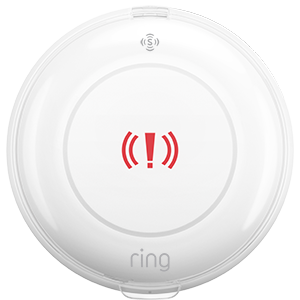
Panic Button (3rd Gen)
Call for help in an instant with a portable button that keeps emergency response at your fingertips.
Key Features
- Emergency help when you need it
- No Base Station required
- Place it anywhere
- Low battery chirps1
- Amazon Sidewalk compatible2
- Add Professional Monitoring with a compatible Ring subscription3
- Chime Plus can play chirp tones for the Panic Button (3rd Gen) without a Base Station
Tech Specs
Size | 2.42 x 0.81 in. (6.16 x 2.06 cm) |
Power | 2 x CR2032 coin cell batteries (included) |
Approximate Battery Life | Up to 3 years (dependent on usage and proximity to Sidewalk Gateway) |
Connectivity | Amazon Sidewalk or Z-Wave (alarm base station required for Z-Wave) |
Operating Conditions | 32°F to 120°F (0°C to 49°C) |
Box Includes | Panic Button Physical QR code for setup Physical QR code for device setup guide |
Software Security Updates | Learn more about software security updates. If you already own this device, visit Software Security Updates in Ring Control Center for information specific to your device. |
System Requirements |
Related Articles

1 Requires Ring Alarm or Ring Alarm Pro, sold separately.
2 Requires Amazon Sidewalk coverage for use. Coverage may vary by location and is subject to change or interruption. To check approximate Amazon Sidewalk coverage in your area here.
3 Compatible Ring subscription is required to enroll in Professional Monitoring. Service available in all 50 U.S. states (territories not included) and in Canada (excluding Quebec). Ring does not own its monitoring center. Smoke and carbon monoxide monitoring is not available for business or commercially zoned addresses. See Ring Alarm licenses at: ring.com/licenses. Additional fees may be required for permits, false alarms, or Alarm Verified Guard Response, depending on your local jurisdiction.