
Troubleshooting Ring Alarm Flood & Freeze Sensor
Learn how to fix your Alarm Flood & Freeze Sensor if you are experiencing these issues:
- Poor connection
- Sensor offline
- Unresponsive sensor
- Water or temperature detection not working


Understanding Flood & Freeze Sensor light patterns
The light on your device will indicate its status. Learn more about Flood & Freeze Sensor light patterns.
Fixing Flood & Freeze Sensor water and temperature detection
Stuck detecting water
Make sure the bottom of your sensor is completely dry and that nothing conductive is touching the bottom of the sensor. Check the Ring app dashboard for a message that says “Water Detected!” Tap Take Action to dismiss the message.
Does not detect water
Water has to be touching both contacts on the bottom of the device for it to trigger. Reposition your Flood & Freeze Sensor so it is on a flat surface where water would pool. Choose locations next to possible sources of flooding, but place it so it won’t be accidentally moved.
Stuck showing low temperature
The Flood & Freeze Sensor triggers an alert if the temperature drops below 40º F (4.4º C). It will not clear the message until the temperature at the position of the sensor increases to above 45º F (7.2º C).
If issues persist:
Try the steps for fixing your Flood & Freeze Sensor connection to make sure your device is online and responding.
Fixing your Flood & Freeze Sensor connection
If the Ring app reports a poor Z-Wave signal, or your device is falling offline, is unresponsive, or does not power on, try the following:
- Move the sensor to within 5 feet from the Base Station. If the connection improves, consider moving the Base Station to a more central location or adding a.
- Detach the cover, and reattach it to refresh the connection status of the device to the Base Station.
- Replace the battery with a new or tested battery.
To check the status of your Flood & Freeze Sensor, remove the battery and re-insert it. The sensor will flash a light pattern on the front to show its connection status. If you are still having issues, factory reset your Flood & Freeze Sensor.
Factory resetting your Flood & Freeze Sensor
If your Flood & Freeze Sensor is not performing as expected and other troubleshooting steps have not resolved the issue, factory reset your device. Then reconnect it in the Ring app.
- Remove the cover.
- For the Flood Freeze Sensor 1st Gen, press and hold the setup button for 10 seconds, or until the LED turns a solid red. For the Flood Freeze Sensor 2nd Gen, press and hold the reset button for 10 seconds.
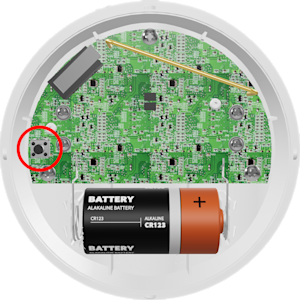
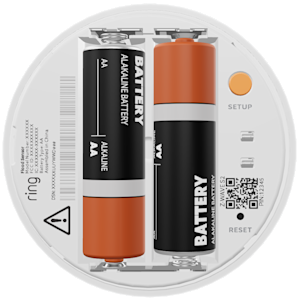
- The device will automatically enter setup mode and start flashing blue when the reset is complete.


After the Flood & Freeze Sensor has been factory reset, you will need to set it up again in the Ring app. Learn how to set up and use the Ring Alarm Flood & Freeze Sensor.